Latte Scanner
From the makers of Latte PDF
A free scanner that keeps your papers on your device.
Latte Scanner is the scanner from the makers of Latte PDF, and scanning is free. Hold your iPhone or iPad over a page and it finds the edges, straightens it, cleans it up and reads the words, right on the device. No account, no ads, no tracking.
- Read on your device
- No account, no tracking
- Locks and backups free
- Pro $7.99 once, no subscription
Get one email when it is out
Leave your email and we'll write once, the day Latte Scanner is in the App Store. No account, no newsletter.
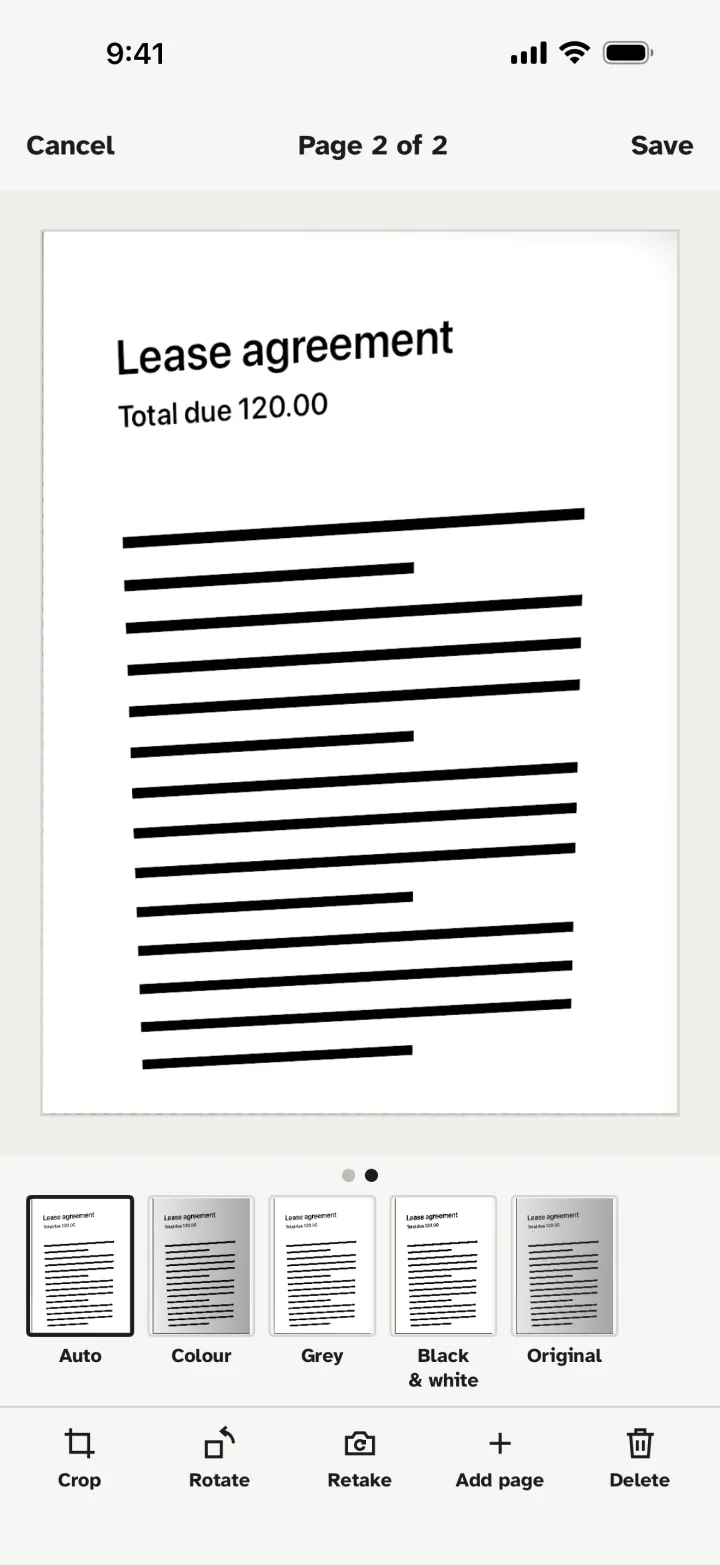
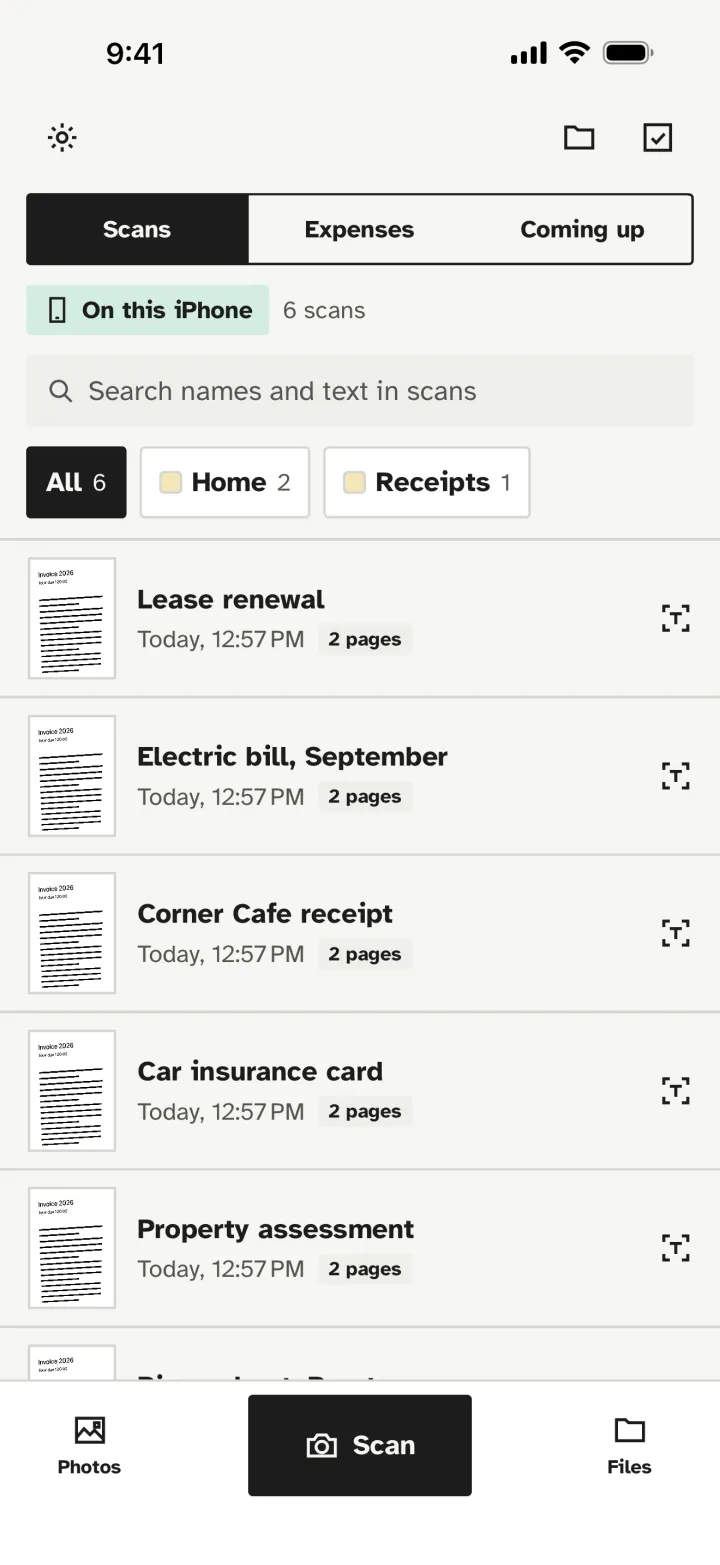
Every screen, made to be read at a glance.
Large type, plain words and one clear button per screen. This is Latte Scanner as it runs on an iPhone.
Your library
Every scan named for you, searchable by the words on its pages, and marked as kept on this iPhone.
Review each page
Auto, Colour, Grey or Black and white, with Crop, Rotate and Retake one tap away.
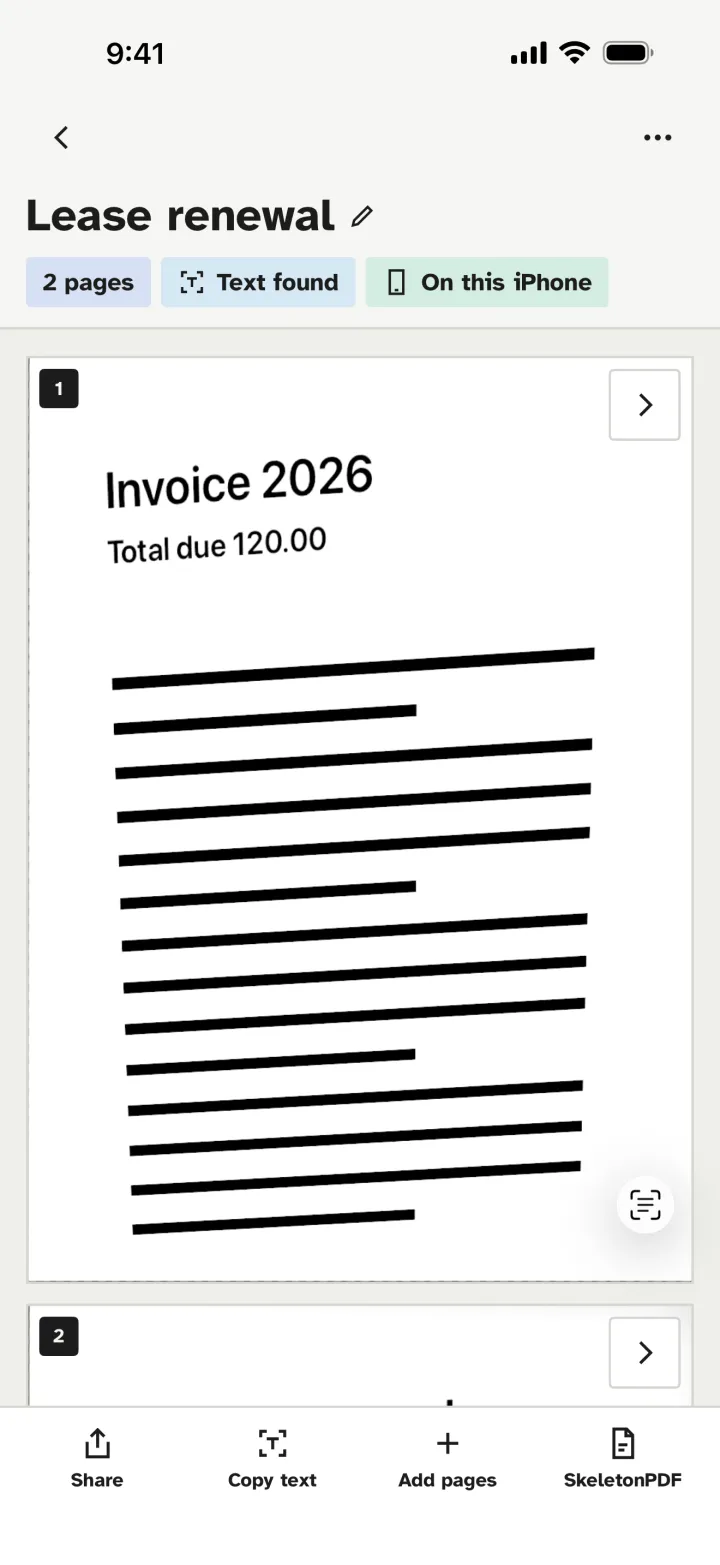
Text found
The words were read on the device as you scanned. Copy text out, or send the scan to Latte PDF.
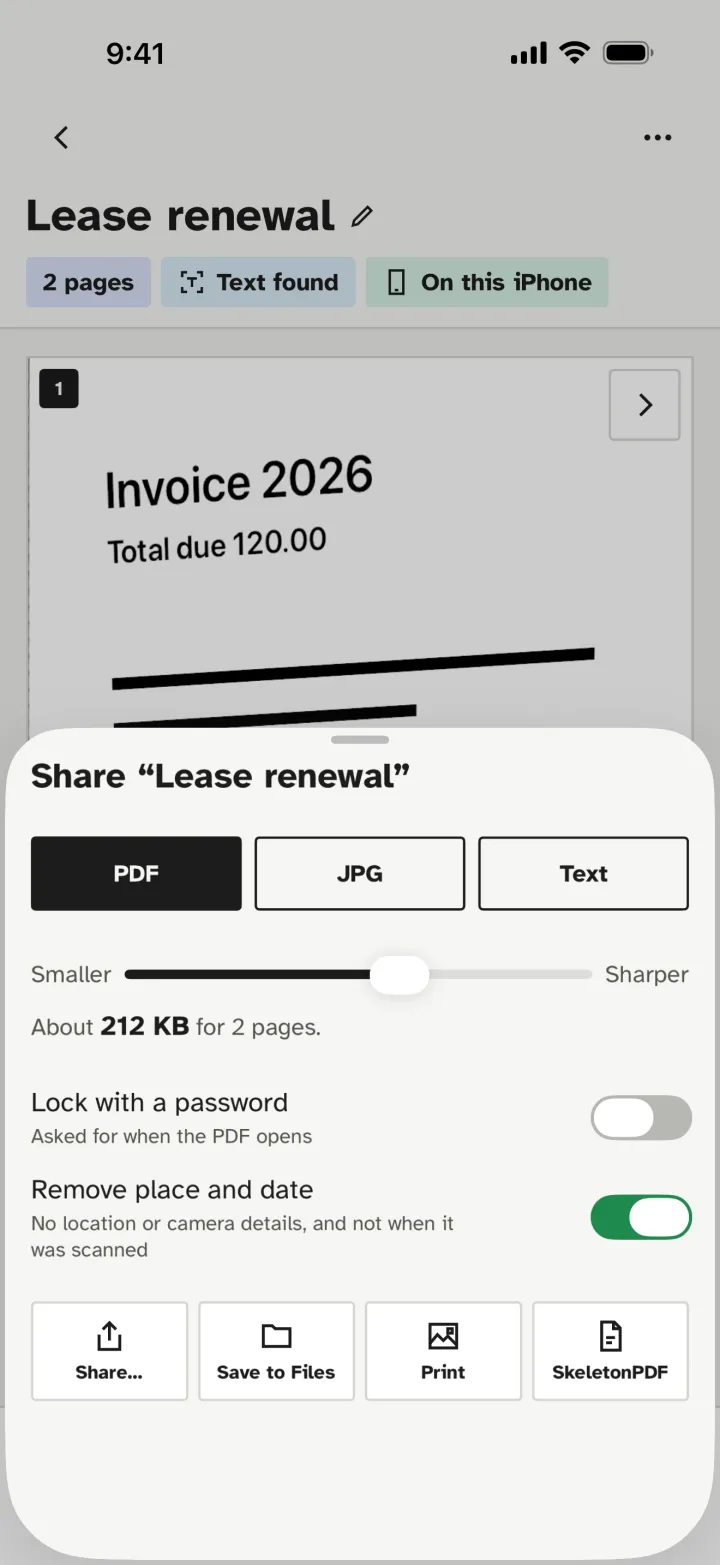
Share as you mean to
PDF, JPG or text, a size slider, a password, and place and date removed before it goes.
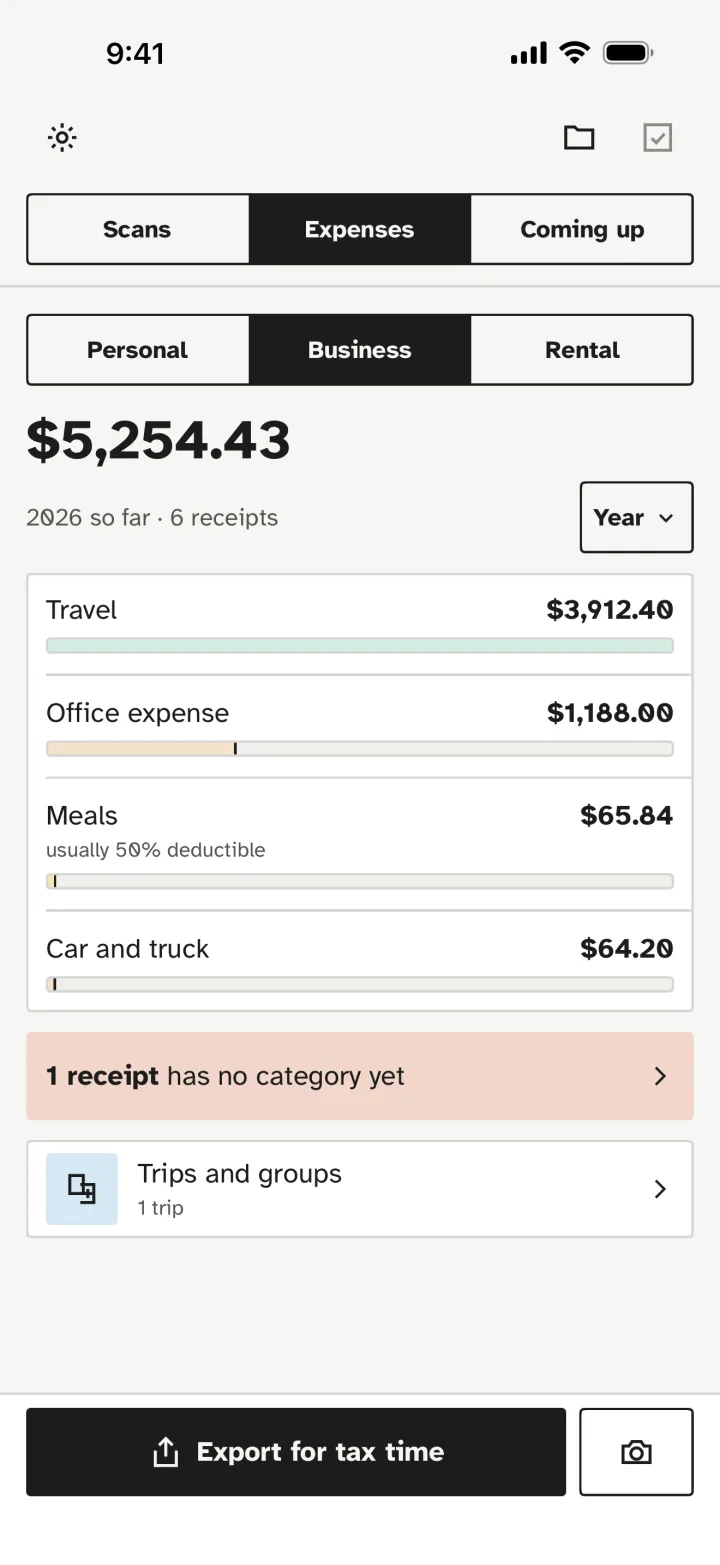
Expenses for tax time
Receipts read into Business, Rental or Personal, with the categories your tax form uses. Latte Scanner Pro.
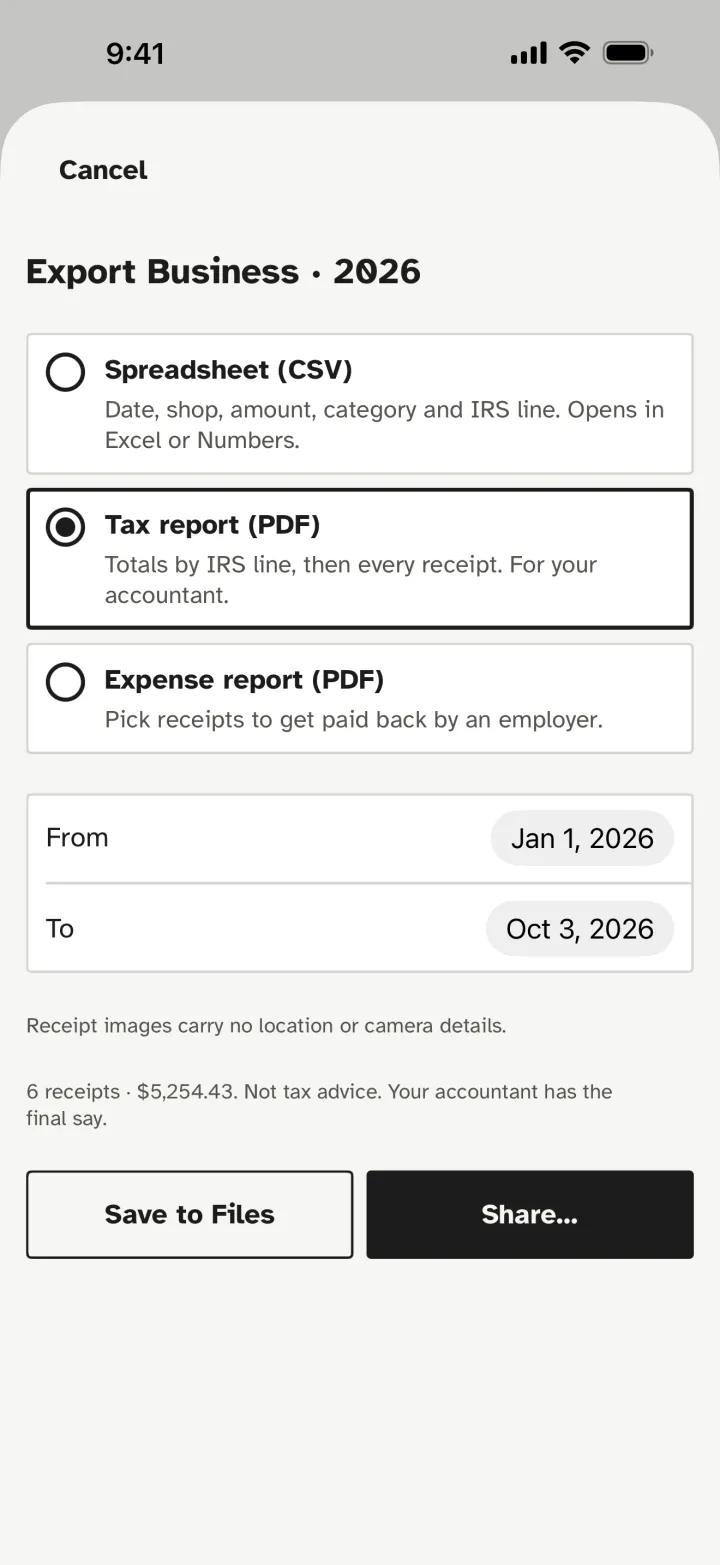
Reports in one tap
A spreadsheet, a tax report by IRS line or an expense report, with no location or camera details on the receipts. Latte Scanner Pro.
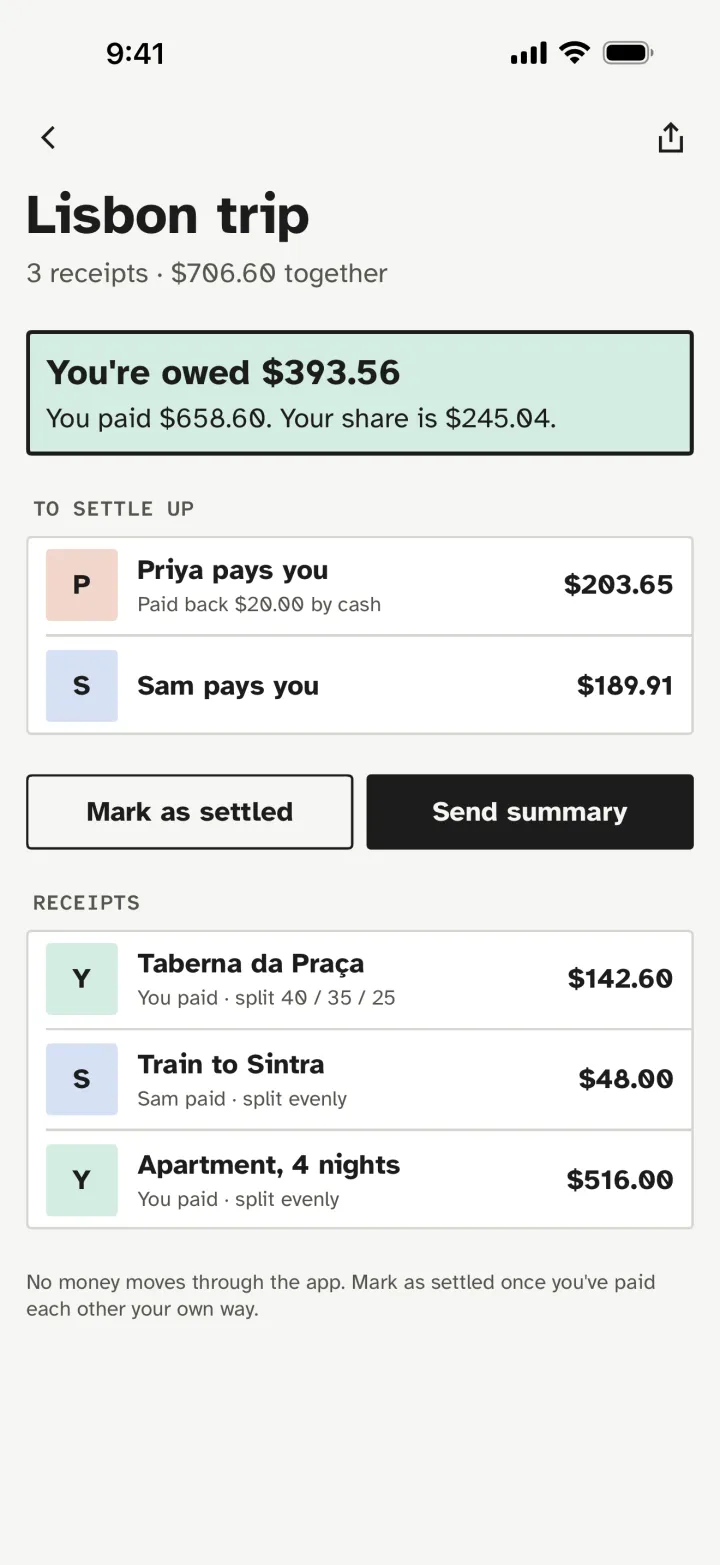
Split a trip
Who paid, who owes whom, and the fewest payments to settle up. No money moves through the app. Latte Scanner Pro.
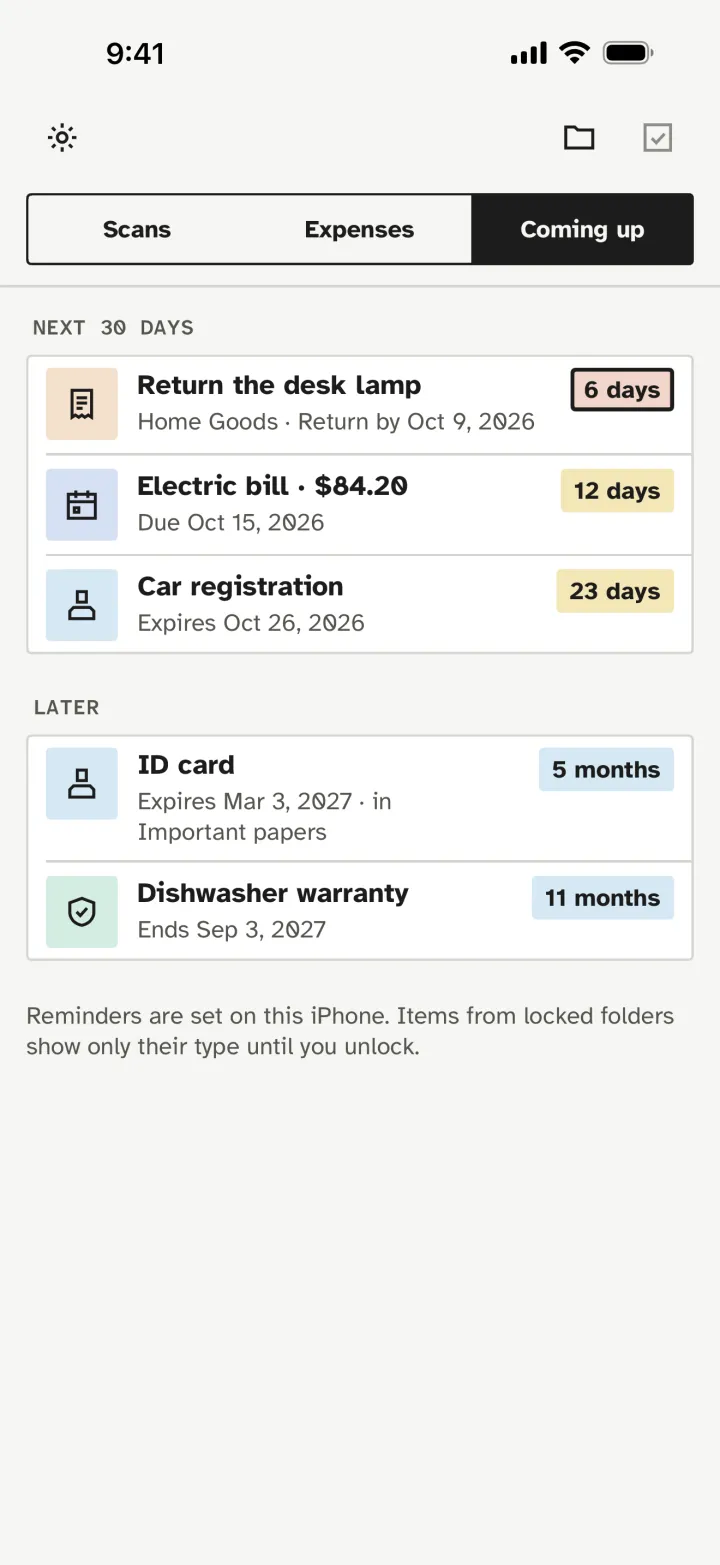
Coming up
Returns, bills, IDs and warranties, reminded on your iPhone before they lapse. Latte Scanner Pro.
Fewer taps, better pages.
Most scanners hand you a row of settings. Latte Scanner makes the usual choices for you and keeps every one of them a tap away.
Takes the picture for you
Hold the phone over the page. It shoots when the page is steady, then waits for the next one. Tap once when you are done.
Searchable from the start
Every page is read on your device, so you can search the words in all your scans and copy text out of them.
Names each scan
A new scan is named from what is on it, such as its date and heading, so you are never left with "Scan 37".
Clean pages, no settings
Shadows and grey paper are cleaned up for you. Colour, grey and black and white are one tap away.
Black out, sign, lock
Black out an account number for good before you send a page, sign with your finger or Apple Pencil, and lock the app with Face ID.
Receipts, IDs, passports, books
Long receipts in one piece, both sides of an ID card on one page, a passport's photo page at its true size with its expiry date read (checked against its own check digits when its machine-readable lines can be read), and a book split into its two pages.
QR codes and barcodes
Read on your device, from the camera, a photo or a page you scanned. It shows where a link goes and opens nothing until you tap.
Business cards to Contacts
The name, company, phones, emails and address are read on your device for you to check, then Apple's own contact sheet saves them.
Automatic export to a folder
A searchable PDF of each scan, kept up to date in a folder you pick in the Files app, by month; locked scans only if you include them. These copies are not locked.
Your scans stay on your devices.
IDs, medical letters, tax papers and contracts are what people scan most. Latte Scanner does all of its work on your iPhone or iPad, including reading the text, so there is nothing to upload and no account to make.
Latte Scanner goes online only where you tell it to.
There is no Latte Scanner cloud and no account, no tracking and no analytics. A scan leaves your device only when you send it or save it somewhere else, or in the backup you choose: your own iCloud, your device's own backup, or a locked backup file. It asks the first time you open it, so a lost phone doesn't lose your scans; the choice is yours, and you can change it any time.
- Scans uploaded to us
- None
- Account required
- No
- Tracking in the app
- None
- Text recognition
- On your device
- Internet needed to scan
- No
- Backups
- Locked, where you choose
The scanner that doesn't follow you around.
Most popular scanners charge a subscription for the good parts, and their App Store labels say they use your data to track you across other apps. Latte Scanner is free to scan, never tracks you, and asks for one payment if you want more.
| Latte Scanner | Adobe Scan | CamScanner | Scanner Pro | Genius Scan | |
|---|---|---|---|---|---|
| How you pay | Yes. Free; Pro $7.99 once | No. Subscription | No. $59.99 a year | No. Subscription | No. Subscription |
| No subscription | Yes | No | No | No | No |
| Doesn't track you (App Store label) | Yes. No tracking | No. Tracks you | No. Tracks you | No. Tracks you | Yes |
| Free with no watermark | Yes. No page limit | Partly. More in paid plans | No. Watermark when free | Partly. More in paid plans | Partly. More in paid plans |
| Business cards to Contacts | Yes. Read on your device, free | Yes | Not stated on its own page or listing | Not stated on its own page or listing | Yes. In a paid plan |
| Reads QR codes | Yes. On your device, free | Not stated on its own page or listing | Yes | Yes | Yes |
| Expenses, mileage and rentals | Yes. Pro, $7.99 once | No | No | Partly. Paid add-on | No |
What three years cost
Each app's paid plan, at the company's own price.
Read on your device, no account
Edges, clean-up and text recognition run on your iPhone or iPad, so scanning works in airplane mode. There is nothing to sign up for.
Locks and backups, free
Face ID, a locked Private folder, and backups locked before they leave the device with a recovery key only you hold.
Edit the words on your computer
Send a scan to Latte PDF and change the words, fill in the form or sign it, still offline.
Their prices and features as each company showed them in US dollars in October 2026, on its own website or App Store page. They can change, so check before you buy.
Scan on your phone. Edit on your computer.
Scan
Scan the letter, form or contract with Latte Scanner. The words are read as you scan.
Send
AirDrop it to your computer, or save it in the Files app wherever you choose. It goes only where you send it.
Edit
Open it in Latte PDF. The text is already recognised, so you can change a word, fill in the form or sign.
Free to scan. $7.99 once for more.
Scanning is free, with no limit on how many pages or documents: scan, clean up, search, share, export and send to Latte PDF. Locks, the Private folder and backups are free too. If you want more, Latte Scanner Pro is one payment of $7.99 in the App Store. No subscription, free updates to everything you've bought, and it covers your iPhone and iPad and your Family Sharing group.
Pro is free with Latte PDF Personal
When Latte Scanner launches, every Latte PDF Personal licence will come with a code for Latte Scanner Pro at no cost, emailed to the address you bought with.
Latte Scanner Pro adds
Expenses, mileage and rentals
Receipts read into expenses on your device, filed under Business, Rental property or Personal, and a mileage log for business trips. Rental properties with their units, tenants and rent received. Reports for tax time.
Split with friends
Trips and groups, who owes whom, and the fewest payments to settle up. No money moves through the app.
Monthly budget
One everyday amount, limits per category, and fixed costs counted for you.
Coming up reminders
Reminders for IDs and passports (9 months before a passport runs out), warranties, returns and bills, set on your iPhone.
About Latte Scanner.
When can I get it?
Latte Scanner comes to the App Store after the Latte PDF Mac release. Leave your email at the top of this page and we will write once, the day it is out.
Does it need the internet?
No. Scanning, cleaning up pages and reading the text all happen on your iPhone or iPad, so it works in airplane mode. The app goes online only for these: the App Store when you open Latte Scanner Pro (for its price) or tap to buy, restore or redeem it, and Apple's own updates of your purchase; your own iCloud if you choose to keep your scans there, locked by the app before they go, and your iCloud Keychain for the backups' key and your invite code (and an automatic backup or export folder you pick, such as iCloud Drive or Dropbox, whose own app may upload its files); and our licence server when you tap a button in Invite friends, apply a friend's code or ask for the Latte PDF code in Settings, which sends only what that button needs (a friend's code alone, your code and its secret, Apple's record of your Pro purchase, or, for a reward licence, your code, its secret and the email address you type), never anything from your scans. Your papers never touch our servers. A link read from a QR code opens in Safari only when you tap Open in Safari; the app itself loads nothing from it. The privacy policy lists each one.
Where are my scans kept?
On your iPhone or iPad, in the app. Before your first scan, Latte Scanner asks what should happen to them if you lose it: kept in your iCloud, only in your device's own backup, or kept only on the device. You can also make a locked backup file, or have one kept up to date in a folder you pick, such as iCloud Drive or Dropbox; Latte PDF on your computer opens it with your recovery key. Export everything saves all your scans, with their folders, as PDFs to any place you pick, and Automatic export keeps a PDF of each scan up to date in a folder you choose (locked scans only if you include them). Those copies are not locked, and a folder's own app, such as iCloud Drive or Dropbox, may upload them.
Does it read QR codes, business cards and passports?
Yes, on your device, for free. Code on the camera reads a QR code or barcode: it says what kind it is and where a link goes, and opens nothing until you tap. In Card mode, a business card's name, company, phones, emails and address are read for you to check, and Apple's contact sheet saves them, with no access to your contacts. In Passport mode, the photo page is kept at its true size and its expiry date is read from the machine-readable lines, with every check digit checked, or from the printed date when those lines can't be read; the passport number stays inside the scan, never in a reminder.
Do I need Latte PDF to use it?
No. Latte Scanner works on its own: scan, search, black out, sign and send. Latte PDF is for when you want to change the words in a scan on your computer.
Which devices does it run on?
iPhone and iPad. Latte Scanner Pro covers both, on every device signed in with your Apple Account, and your Family Sharing group.
What is free, and what does Pro add?
Scanning is free, with no limit: the camera, clean pages, text recognition, search, folders, Black out, Sign, sharing, Export everything, Automatic export and sending to Latte PDF. So are QR codes and barcodes, business cards to Contacts, Passport mode, every lock, the Private folder, locked and hidden folders, and backups.
Latte Scanner Pro, $7.99 once, adds expenses with IRS categories and reports, a mileage log, rental property (units, tenants, rent received and a Schedule E report), splitting receipts with friends, a monthly budget, and reminders for expiry dates (passports and IDs too), warranties, returns and bills. Expense categories help you sort; they are not tax advice, and your accountant has the final say.
I bought Latte PDF Personal. How do I get Latte Scanner Pro free?
Scanning is free for everyone. A Personal licence email also has a code for Latte Scanner Pro, from the day Latte Scanner is in the App Store (Solo and Office don't include Pro). If you bought Personal before then, we email you one when it launches. In Latte Scanner, open Pro (from Expenses, or Settings › Help and privacy), then tap Redeem a code. Lost the email? Find my key sends it again with your code.
How do invite codes work?
Once Latte Scanner is in the App Store, it will work like this. In Latte Scanner, open Invite friends and tap Get my invite code for your own code. A Latte PDF licence comes with a code of its own, which works for Latte PDF today and in Latte Scanner once it launches, and each counts its own friends. A friend who uses your code pays $3.99 instead of $7.99 for Latte Scanner Pro, or 50% less for Latte PDF Solo ($5) or Personal ($6.50); an invite code never takes anything off Office. When 3 friends have bought, you get Pro free; at 5, a Latte PDF Solo licence: Latte Scanner shows a claim code to enter on our website with the email address it is for. Refunded purchases don't count. A code works for at most 25 friends a year in both apps together and is for people you know: please don't sell it or post it publicly. We never tell you who bought. Once it launches, each Latte Scanner Pro purchase also comes with one Latte PDF code, in Settings › Latte PDF for your computer: what you paid for Pro comes off Latte PDF Personal, which includes Pro, so buying both costs the same in either order. See the terms of sale.
How do I get Pro on a new iPhone or iPad?
Sign in with the same Apple Account, open Latte Scanner, open Pro, then tap Restore purchase. Refunds go through Apple, which handles App Store payments.